
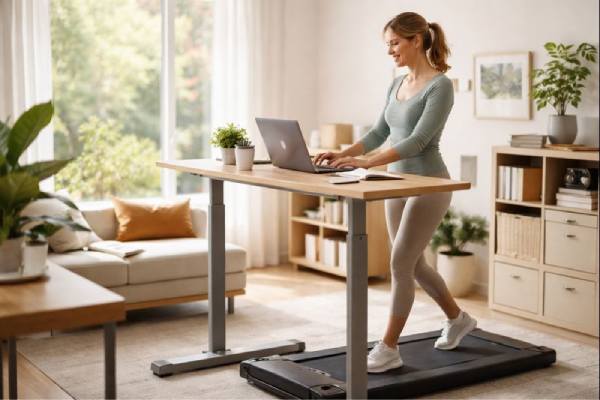
A walking pad desk turns “dead time” at your computer into gentle movement—without forcing a full workout into your schedule. For many people, that shift can feel surprisingly meaningful: less afternoon slump, fewer restless jitters, and a steadier sense of momentum across the day. The best results usually come from treating it as a light-intensity tool for attention and mood—not a performance test. Walking while working changes your body’s arousal level, breathing rhythm, and posture demands, which can either sharpen your focus or make you feel scattered, depending on speed, task type, and setup. This guide explains what a walking pad desk can realistically do for concentration and emotional balance, what can backfire, and how to dial in the “right dose” so you finish work feeling better, not wrung out.
Essential Insights
- Light walking can reduce sluggishness and improve mental energy during long desk days.
- Many people find mood and stress feel more stable when sitting time is broken up consistently.
- Faster speeds can degrade fine-motor work (like heavy typing) even if you feel more awake.
- Avoid use if balance, dizziness, or certain medical conditions make falls more likely.
- Start with 10–20 minutes at a very easy pace and match walking to lower-precision tasks first.
Table of Contents
- What a walking pad desk is
- How light walking affects focus
- Mood, anxiety, and stress effects
- Best speed and daily dose
- Ergonomics for comfort and productivity
- Safety limits and who should avoid
- A practical 14-day starter plan
What a walking pad desk is
A walking pad desk is a work setup that lets you walk slowly while using a computer. It usually means an under-desk treadmill (often called a walking pad) placed beneath a standing-height desk or an adjustable sit-stand desk. The key word is slow: most people use it at a gentle pace meant for steady movement, not heavy sweating.
How it differs from a treadmill and a standing desk
A walking pad is typically slimmer and quieter than a full treadmill, with a simpler console and a speed range designed for walking rather than running. Compared with a standing desk alone, it changes the day in a different way: standing reduces sitting, but walking adds rhythmic muscle activity that can help with energy regulation and restlessness.
What it can realistically change
Used consistently, a walking pad desk can:
- Cut long, unbroken sitting periods into shorter chunks.
- Add a meaningful number of steps without needing extra “exercise time.”
- Create a mild increase in heart rate and breathing, which can shift alertness.
- Reduce the sense of being “stuck” at your desk—especially in the afternoon.
A common experience is that the body feels less heavy late in the day. That matters for mental health because physical inertia and mental inertia often travel together: when the body stays still for hours, it can be harder to change emotional gears.
What it will not do on its own
It is not a guaranteed fix for anxiety, low mood, attention problems, or sleep issues. It also won’t automatically improve productivity if your workflow demands precision typing, complex spreadsheets, or design work that relies on steady hand control. Think of it as a lever you can pull—helpful, but sensitive to how you use it.
If you treat a walking pad desk as a “background habit” that supports your day, it tends to fit. If you treat it like a test of discipline, it can become another stressor.
How light walking affects focus
Moving while you work changes focus in two competing ways: it can increase alertness, but it also adds a small “coordination cost.” The sweet spot is using walking to lift your baseline energy without stealing the precision your task needs.
Why focus can improve
Light walking can nudge your nervous system toward a calmer form of alertness. Many people describe:
- Fewer urges to check the phone out of boredom.
- Easier task initiation (starting feels less sticky).
- More consistent energy through the mid-afternoon dip.
One reason is simple physiology: muscle activity increases blood flow and oxygen demand, and your brain tends to respond with increased readiness. Another reason is behavioral: walking creates a steady rhythm that can reduce fidgeting and make it easier to stay with a task.
When focus gets worse
Walking can backfire when your task requires:
- Fine motor control (dense typing, detailed mouse work, graphic design).
- High-stakes accuracy (coding under time pressure, financial entry).
- Deep reading with heavy annotation.
At higher walking speeds, your brain allocates more resources to balance and movement timing. You may still feel awake, but you can become sloppier—or need more re-checking, which costs time.
A practical “task-speed matching” rule
Use a faster pace for lower-precision work, and slow down for anything that demands steadiness:
- Best for walking: meetings, calls, brainstorming, reading, outlining, email triage, admin tasks, reviewing documents.
- Often better seated or very slow: complex writing, analysis, intensive typing, design, anything with many micro-decisions.
If you want an objective measure, track errors. For one week, note whether walking increases typos, mis-clicks, or rework. If errors rise, reduce speed first—before you reduce walking time.
Why “a little slower” is usually the secret
Most people get the focus benefit from movement at a pace that feels almost too easy. If you’re slightly out of breath, you’ve likely crossed from “focus support” into “dual-task strain.” Easy walking keeps the mental lift while preserving enough stability for desk work.
Mood, anxiety, and stress effects
Mood changes from a walking pad desk are often subtle but cumulative. You may not feel “happier” in a dramatic way; instead, you may notice fewer sharp dips, less irritability late in the day, and a steadier ability to recover after stressful moments.
How gentle movement can shift mood
Light walking can support mood through several pathways:
- It provides a mild sense of accomplishment and forward motion.
- It can reduce physical tension that builds during long sitting.
- It may help “burn off” stress activation, especially when the body feels keyed up.
Many people also report that walking improves emotional regulation during conflict-heavy or high-demand work. The movement acts like a pressure valve—helpful when stress would otherwise pile up silently.
Anxiety: relief for some, overstimulation for others
For anxious states, a walking pad can help when anxiety feels like agitation, restlessness, or a trapped sensation. However, it can worsen symptoms when anxiety already includes dizziness, shortness of breath sensitivity, or fear of bodily sensations. If your anxiety spikes when you notice your heart rate, start extremely slow, keep breathing steady, and use walking during predictable tasks until your body learns it is safe.
Why you might feel worse at first
Feeling worse usually comes from one of these patterns:
- Too fast, too soon: your body interprets it as strain, not support.
- Wrong task pairing: walking during precision work creates frustration and self-criticism.
- Sensory overload: noise, vibration, or visual motion can be irritating.
- All-or-nothing thinking: using it “perfectly” becomes a new standard you must meet.
If any of these show up, the fix is not quitting. It’s tightening the match between movement and your nervous system: slower pace, shorter bouts, and easier tasks.
What “better mood” often looks like in real life
Instead of chasing a big emotional high, look for:
- A smaller afternoon crash.
- Less stiffness and fewer stress headaches.
- More stable patience in the last hour of work.
- Easier transitions after work because you feel less depleted.
Those are meaningful mental health outcomes, even when they feel ordinary.
Best speed and daily dose
The best walking pad desk routine is the one your body accepts without protest. Start below your “ambitious” pace and build consistency first. Your goal is reliable movement that supports work, not a routine that competes with it.
Helpful speed ranges to try
Most people do well starting in a very gentle range and adjusting by task:
- Easy typing and focused work: about 0.7–1.3 mph (1.1–2.1 km/h)
- Reading, meetings, and calls: about 1.2–2.0 mph (1.9–3.2 km/h)
- Light “movement break” sessions: up to a brisk walk if your setup is stable and your joints tolerate it
If you notice shoulder tension, bouncing, or increased typos, that’s a speed signal. Decrease pace until your hands feel steady again.
How long should you walk while working?
A sustainable range for many adults is 30–120 minutes per workday, broken into smaller blocks. If you are new to it, start with 10–20 minutes, once or twice per day. After a week, add time in small steps (5–10 minutes per session) rather than making big jumps.
A useful approach is “movement anchors,” tied to predictable events:
- First email block of the day
- Post-lunch slump window
- End-of-day admin and planning
Why breaks still matter
Walking is not a substitute for all forms of recovery. Your feet, calves, and hips still need variation. Mix in:
- Short standing resets (no walking)
- Seated deep-work blocks for high-precision tasks
- One or two true off-screen breaks daily
If you try to walk for hours without variation, you may end up with sore feet, irritated knees, or low-grade fatigue that harms mood.
Small details that protect comfort
- Choose supportive footwear if your feet or ankles tend to ache.
- Keep steps short and quiet; avoid stomping or overstriding.
- If you have calf tightness, reduce speed first, then time.
- If you feel overheated, lower speed and improve airflow rather than forcing through.
Consistency is the win. The “best dose” is the amount that improves your day while staying easy enough to repeat.
Ergonomics for comfort and productivity
A walking pad desk can feel great or terrible depending on setup. The goal is a stable upper body, relaxed shoulders, and a screen position that does not tempt you to lean forward.
Desk and monitor setup
- Set desk height so elbows are roughly at a right angle and shoulders stay down.
- Position the monitor so the top third of the screen is near eye level.
- Keep the screen close enough that you do not crane your neck forward.
- If you use a laptop, consider raising it and using an external keyboard and mouse for better posture.
Walking tends to pull you forward. A slightly closer keyboard and screen often prevents that gradual “reach” that strains your neck and upper back.
Keyboard and mouse stability
Small hand movements become harder as speed rises. To protect accuracy:
- Use a larger mouse pad or a stable desk surface that reduces jitter.
- Keep wrists neutral; avoid resting heavily on the desk edge.
- Consider slowing down for detailed mouse work, even if you keep walking for reading.
If you do data-heavy work, you can also split the task: walk for review and planning, sit for execution.
Walking form that supports work
- Keep steps short and soft.
- Stay centered on the belt; avoid drifting toward the front.
- Maintain a gentle arm swing only if it does not disrupt your work—many people keep hands on the keyboard instead.
The more “athletic” you try to make the walk, the less desk-friendly it becomes. Efficient desk walking is almost boring, and that’s the point.
Noise, vibration, and attention
If the pad is loud or shaky, your brain treats it as background stress. Reduce friction points:
- Place it on a stable floor; consider a protective mat if needed.
- Tighten or align the belt if it drifts (following manufacturer instructions).
- Schedule walking during tasks that can tolerate small distractions.
A helpful mindset is to treat walking time as a mode of work. You are not trying to do every task while walking—only the tasks that pair well with movement.
Safety limits and who should avoid
A walking pad desk is generally low intensity, but it still introduces fall risk and repetitive load. Safety is less about fear and more about honest matching: your balance, your medical history, and your workspace.
People who should be cautious or get medical advice first
Consider talking with a clinician before using a walking pad desk if you have:
- Frequent dizziness, fainting, or significant vertigo
- Neuropathy or reduced foot sensation
- Major balance problems or a history of falls
- Unstable heart symptoms, chest pain with exertion, or uncontrolled blood pressure
- Significant joint pain that worsens with walking
- Any condition where you should avoid treadmill use without supervision
If you are pregnant or recovering from injury, the decision is individual. The safest approach is slow speed, strong stability, and a clear plan to stop if symptoms appear.
Workspace hazards to take seriously
Most injuries happen because the environment is not walking-friendly:
- Cords that can snag your feet
- Loose clothing that can catch
- Pets or small children entering the walking zone
- A desk that wobbles when you type
- A pad that slides on the floor
Treat the walking area like a small “active zone.” Clear it, stabilize it, and keep it predictable.
Rules that prevent feeling worse
- Do not walk if you are extremely sleep-deprived, ill, or lightheaded.
- Keep a pace where you can breathe through your nose or speak comfortably.
- Stop at the first sign of sharp pain, numbness, or increasing dizziness.
- If your anxiety spikes with movement, slow down and shorten sessions instead of pushing through.
How to stop safely
Practice stepping off deliberately. When you end a session:
- Reduce speed gradually.
- Pause, then step off to the side, not forward.
- Give yourself 10–20 seconds before sitting if you feel “floaty.”
A walking pad desk should feel like a supportive background tool. If it starts to feel risky or punishing, adjust the setup or pause the habit until you can use it safely.
A practical 14-day starter plan
This plan is designed to help you get benefits without triggering fatigue, frustration, or “I quit” energy. The main principle: you earn duration by keeping the experience easy.
Before you start: pick two walking-friendly tasks
Choose tasks that tolerate small movement:
- Meetings and calls
- Email triage and messaging
- Reading and review
- Brainstorming, outlining, and planning
Keep precision-heavy tasks available as seated work. This separation prevents walking from becoming associated with mistakes.
Days 1–3: build comfort
- Walk 10 minutes once per day at a very easy pace.
- End the session while it still feels fine.
- After each session, rate:
- Focus (1–10)
- Mood (1–10)
- Body comfort (feet, calves, knees)
If any score drops meaningfully, reduce speed before reducing time.
Days 4–7: add a second short session
- Walk 10–15 minutes, twice per day.
- Use one session for low-demand work (emails), one for a meeting or reading block.
- Keep speed low enough that typing accuracy stays steady.
By the end of the first week, you should feel more familiar with the rhythm and less mentally “aware” of the walking.
Days 8–14: build toward a useful daily dose
- Increase one session to 20–30 minutes while keeping the other short.
- Use walking during the time you typically feel sluggish (often post-lunch).
- Keep one daily seated block for deep work.
A good target by day 14 is 30–60 total minutes per workday. Some people will feel ready for more; others will feel best staying here for another week.
A simple long-term formula
- Walk for the tasks that benefit from energy and momentum.
- Sit for the tasks that require precision and complex decisions.
- Adjust speed like a dial, not a challenge.
If you notice persistent low mood, panic symptoms, or significant attention impairment that does not improve with basic lifestyle changes, consider professional support. A walking pad can be a strong tool, but it is not a full evaluation or treatment plan.
References
- Effect of Active Workstations on Neurocognitive Performance and Typing Skills: A Randomized Clinical Trial – PMC 2024 (RCT)
- “It’s Been a Game Changer”: Examining Treadmill Desk Use When Working from Home – PMC 2023
- The effects of active workstations on reducing work-specific sedentary time in office workers: a network meta-analysis of 23 randomized controlled trials – PMC 2023 (Systematic Review and Network Meta-Analysis)
- A systematic review and meta-analysis of the effect of treadmill desks on energy expenditure, sitting time and cardiometabolic health in adults – PMC 2021 (Systematic Review and Meta-Analysis)
- Daily Step Count and Depression in Adults: A Systematic Review and Meta-Analysis – PMC 2024 (Systematic Review and Meta-Analysis)
Disclaimer
This article is for educational purposes and does not replace personalized medical advice, diagnosis, or treatment. A walking pad desk may not be appropriate for everyone, especially if you have balance problems, dizziness, significant joint pain, or cardiovascular symptoms. If you have a health condition, are pregnant, take medications that affect balance or heart rate, or have concerns about safety, speak with a licensed clinician before starting. Stop using a walking pad immediately if you develop chest pain, faintness, new neurological symptoms, or worsening pain.
If you found this guide helpful, consider sharing it on Facebook, X (formerly Twitter), or any platform you prefer.